24-Inch Adjustable Laptop Desk: 360° Swivel + Phone Stand
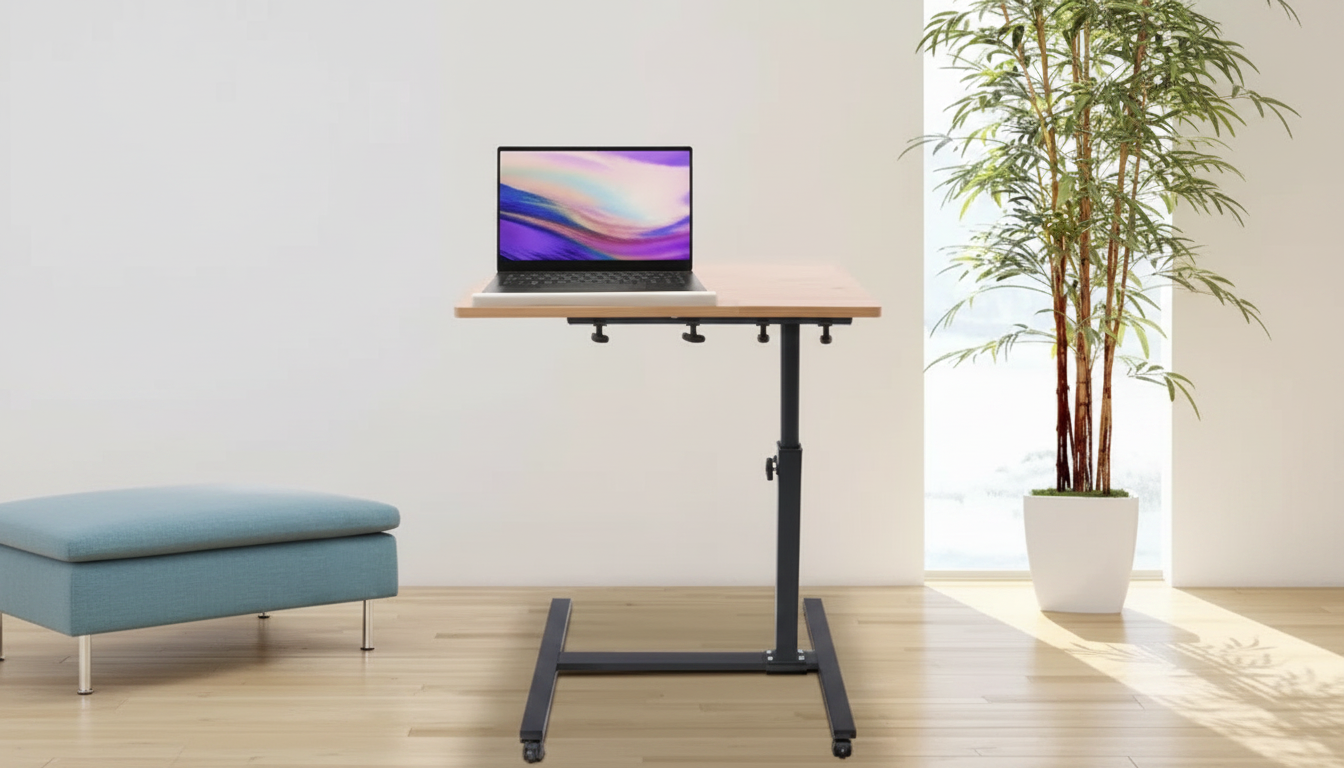
Adjustable 24 Inch Laptop Desk with 360° Rotating Top and Mobile Stand
A compact laptop desk can make everyday tasks—working from a sofa, studying in a small room, or presenting from a tablet—feel more stable and less awkward. This adjustable 24 inch design adds a 360° rotating top for flexible positioning plus a dedicated mobile stand to keep a phone visible for calls, timers, or reference notes.
What Makes This Desk Different
A standard lap desk can work for quick browsing, but it often falls short when you’re typing for an hour, switching between laptop and phone, or trying to line up your screen with an off-center seating position. A 24-inch class surface aims for a sweet spot: large enough for common laptops and small essentials, yet compact enough to move from room to room without turning into furniture you have to “commit” to.
- 24 inch surface sized for many everyday laptops while staying easy to shift between rooms.
- 360° rotating top to angle the work surface toward a chair, bed, or couch position without lifting the whole desk.
- Mobile stand keeps a phone upright and separated from the main work area for fewer distractions and more usable space.
- Adjustability intended to help fine-tune height and viewing angle, reducing hunching and wrist strain during longer sessions.
- A practical option for tight spaces where a full-size desk is not realistic.
If you want a flexible setup that can follow you around the home, consider the Adjustable 24 Inch Laptop Desk with 360° Rotating Top and Mobile Stand.
Core Features to Look For in Daily Use
Small design choices show up fast once you start using a desk daily. The most helpful setups support your posture, keep your tools within easy reach, and feel steady when you type (not just when you place a laptop down).
- Height adjustment range: aim for elbows close to a 90° bend while typing, with shoulders relaxed.
- Rotating top behavior: smooth rotation that allows repositioning without bumping a mouse, drink, or notebook.
- Work surface space planning: leave room for ventilation around the laptop and a small area for a mouse or notes.
- Mobile stand placement: check whether the phone sits at a comfortable glance angle for video calls and notifications.
- Stability under typing pressure: the desk should feel steady when palms rest on the surface and when shifting posture.
- Edge comfort: rounded or smooth edges reduce forearm pressure over time.
- Portability: weight and footprint should match the intended use (moving often vs. leaving in one spot).
Quick Feature Comparison: Rotating Laptop Desk vs Typical Lap Desk
| Feature | This Style (Adjustable + Rotating Top + Mobile Stand) | Typical Basic Lap Desk |
|---|---|---|
| Work surface size | 24 inch class top for laptop + small essentials | Often smaller; may feel cramped with a mouse |
| Angle/position flexibility | 360° rotation helps align the top to the body position | Limited; repositioning usually means lifting the whole desk |
| Phone visibility | Dedicated mobile stand keeps screen upright | Phone often lies flat or takes up work space |
| Ergonomic tuning | Height/position adjustments support more neutral posture | Minimal adjustment; posture depends on seating |
| Best for | Hybrid home use, studying, couch/bed sessions, small rooms | Short tasks, occasional browsing, travel |
Best-Use Scenarios
The standout advantage of a rotating, adjustable top is that it adapts to how real people sit. Not every couch is square to a TV stand, not every bedroom has space for a chair, and sometimes the “desk” is wherever the best light is. This style of desk is built for those realities.
- Couch workstation: rotate the top toward the torso while keeping the base stable on the floor or beside seating.
- Bedside setup: position the top so the screen is closer to eye level; use the mobile stand for calls or reading.
- Small apartment study corner: a compact alternative to a permanent desk, easy to tuck away after use.
- Crafting and journaling: rotation helps shift between writing, referencing a phone/tablet, and using tools.
- Presentations and video calls: phone can stay upright on the stand while a laptop handles notes or slides.
For students or remote workers trying to stay organized in a tight space, pairing a flexible desk with a simple planning tool can help keep work sessions focused. A lightweight digital option like Save Smart, Stress Less: Your Monthly Savings Calculator Guide can also support budgeting for school or home office essentials without adding physical clutter.
How to Set It Up for Comfort
For practical workstation guidance that translates well to compact desks, see the OSHA Computer Workstations eTool and the ergonomics references from Cornell University Ergonomics.
Stability, Safety, and Care Tips
Who This Desk Fits Best
If you’re building better work habits along with a better setup, a quick-read digital workbook like Train Your Mind to Think Like a Millionaire can complement a more intentional daily routine.
FAQ
Will a 24 inch laptop desk fit most laptops?
In many cases, yes—a 24-inch class surface typically fits common laptop sizes with extra room for small essentials. Measure your laptop’s width and depth, and leave a little space around it for airflow and for a mouse or notepad.
What is the benefit of a 360° rotating top?
Rotation helps align the work surface with your actual seating angle, which can improve reach for typing and mousing. It also reduces the need to lift and reposition the entire desk when you shift from couch to chair or change your posture.
Is a mobile stand useful if the laptop already has a screen?
It can be very useful for video calls, reference material, and keeping notifications visible without taking up your main work surface. Holding the phone upright also makes it easier to glance at comfortably instead of looking down repeatedly.













Leave a comment